



Last Updated on September 19, 2026 by Jade Artry
What Data Does Perplexity Collect About You?
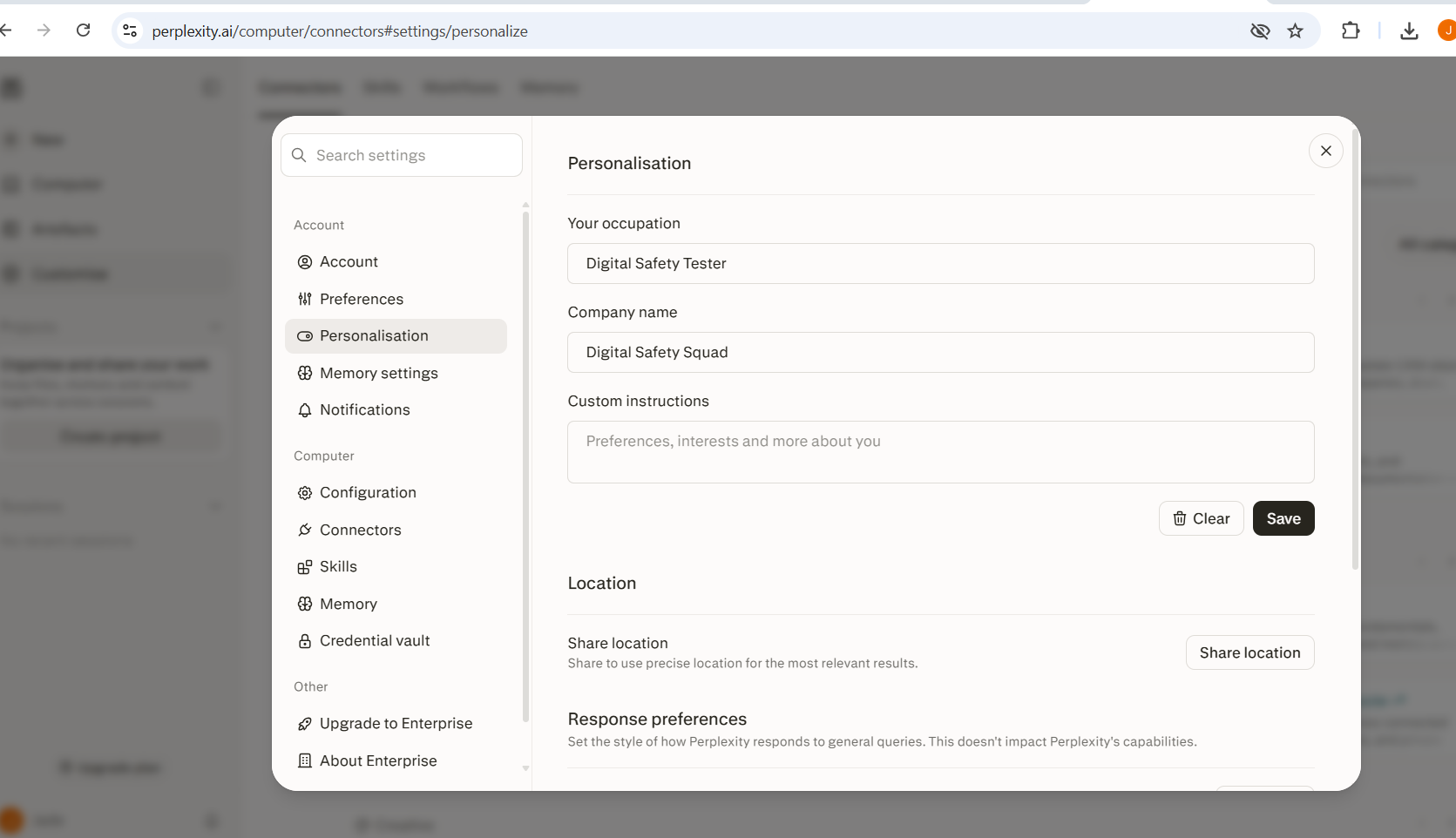
Perplexity collects your search queries, account information, device data and, if you've enabled Personalization, details such as your occupation, company, date of birth, custom instructions and precise location.
| Category | What's included |
|---|---|
| Queries | Everything you search or ask, including follow-up conversation |
| Account information | Email address and subscription details |
| Device and service data | IP address, device type, ordinary technical logs |
| Personalisation | Occupation, company, date of birth, gender, custom instructions |
| Precise location | Only if you've enabled it |
| Uploaded files | Documents and images shared in a conversation |
| Spaces and Projects | Organised, persistent collections of related searches and files |
| Feedback | Any ratings or reports you submit |
I'd pay particular attention to Personalisation here because this is information you may have added gradually and then forgotten was attached to the account.
Does Perplexity Use Your Searches to Train AI?
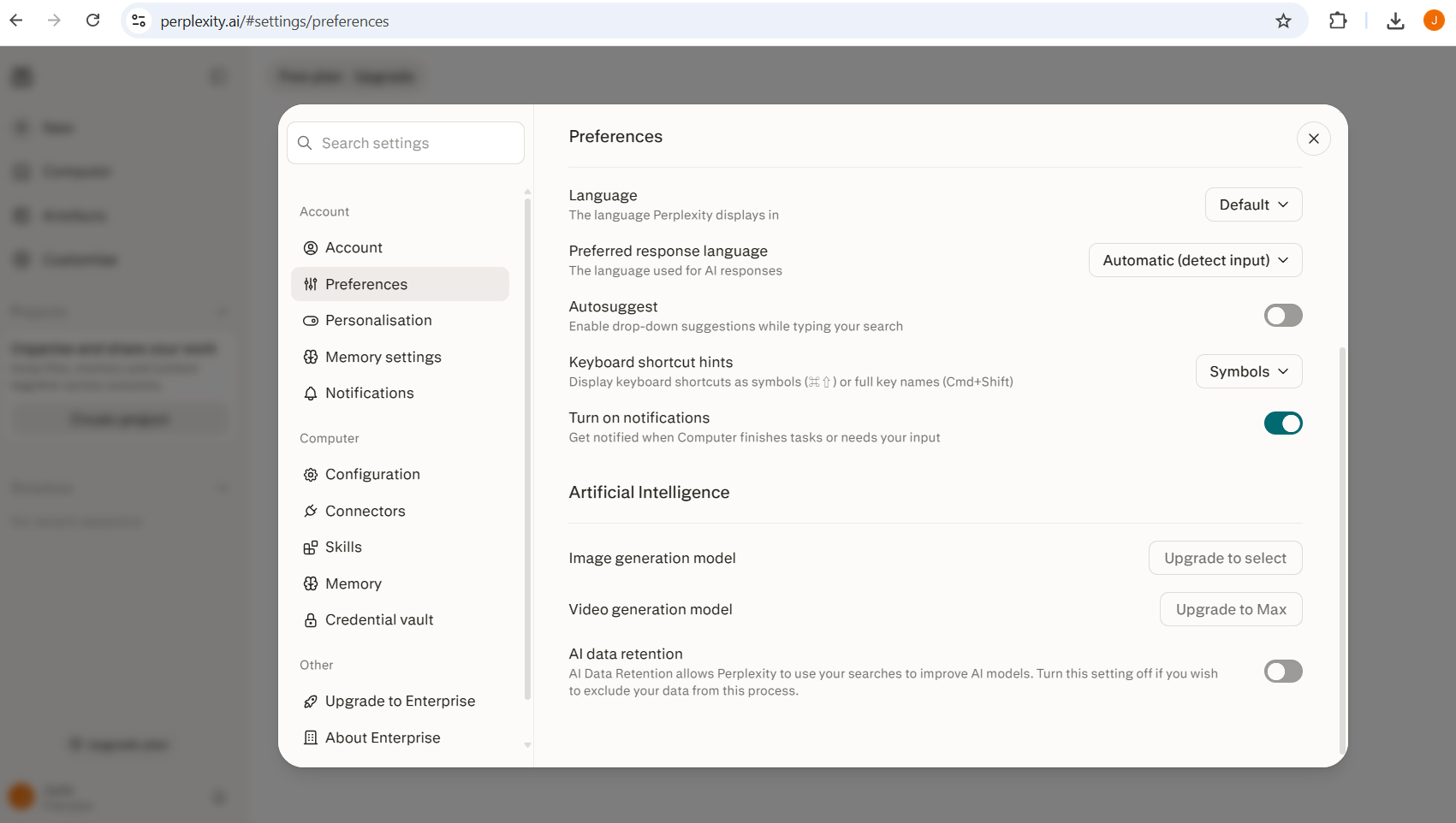
Perplexity does use your searches to train AI by default, on every consumer tier. If you use the Free, Pro or Max consumer version, this is the setting I'd check first. AI Data Retention is enabled by default. Perplexity's current documentation states this can be switched off under Account Settings, then Preferences, then AI data retention. Enterprise accounts are handled separately and excluded from training entirely, with Zero Data Retention and Zero Data Training agreements covering the underlying AI providers Perplexity relies on.
What Does Turning Off Perplexity AI Data Retention Actually Do?
Turning AI Data Retention off stops eligible consumer queries being used for model training going forward, but it does not stop the processing needed to provide the service, comply with legal obligations or operate Perplexity itself. Switching training off reduces what Perplexity can do with your queries afterwards; it doesn't mean your query somehow bypasses Perplexity's servers altogether.
Perplexity Signed Out vs Signed In vs Incognito: Which Is More Private?
Signed-out Perplexity isn't linked to a named account, though the session itself can remain accessible for a period; standard signed-in use saves to your account history and Personalization, while Incognito keeps the session separate and expires it rather than adding it to normal history. The differences matter more than most people assume when deciding how to use the product day to day.
| Mode | Account-linked? | Saved history? | Personalisation? | Used for training? |
|---|---|---|---|---|
| Signed out | No | Anonymous session retained and accessible for up to 14 days; not saved long-term to an account | No | Not clearly specified in the current help documentation we checked |
| Signed in, standard | Yes | Saved to account history | Yes, if enabled | Yes, unless AI Data Retention is switched off |
| Incognito | Yes, but session is separate | No, expires within 24 hours | No | No |
Does Perplexity Save Your Search History and Personal Information?
On a standard signed-in account, yes, and because people use Perplexity like a search engine, ordinary queries about health, relationships, work, money, travel or other people can build a revealing picture over time even if you never upload a sensitive document. This is the angle most safety reviews miss, and it's worth spelling out because it's genuinely different to a standard chatbot risk.
People type search queries almost reflexively, in a way they'd hesitate to type into a chat: symptoms they're worried about, relationship problems, a job they're applying for on the side, financial concerns, travel plans, or someone they're researching. None of those individual queries feels like ‘sharing personal information' the way pasting in a document does. But a research tool that blends search and conversation can accumulate a genuinely revealing picture over time, purely from ordinary, well-intentioned use, without you ever consciously deciding to hand over anything sensitive.
That's worth knowing specifically because Perplexity's personalisation features are built to make exactly this kind of accumulation more useful to you, which means it's also more useful to whoever holds the data. I use Perplexity myself for exactly this kind of search-heavy research, and the thing I've actually changed since checking this is smaller than people expect: I don't sign in for anything health or family-related, and I keep that entirely separate from my everyday signed-in account.
Is Perplexity Search Safer Than the Comet Browser?
Perplexity Search, its mobile app and the Comet browser are separate products with different permissions, capabilities and security risks, and Comet specifically carries the most additional risk. If you've seen headlines saying ‘Perplexity has a security problem', this distinction matters, since lumping all three together makes it harder to judge any specific risk properly.
- Perplexity web and search: the core AI-powered answer engine, combining real-time web search with cited, generated answers.
- The mobile app: a separate codebase with its own permissions and its own documented security findings, covered below.
Comet, the browser
Perplexity's AI-integrated browser, which introduces a different risk surface again, including how it handles content on the pages you visit.
Since Comet's title puts ‘browser' in scope, it's worth explaining properly rather than a one-line mention. Comet is agentic, meaning it can take actions on your behalf across the web, not just answer questions about it. That creates a specific risk called prompt injection, where hidden instructions embedded in a webpage, invisible to you but readable by the AI, can attempt to hijack what the agent does next, potentially including actions on accounts you're logged into elsewhere. Independent security researchers, including Brave, have published findings on this exact class of attack against agentic browsers.
Practically, this means Comet carries meaningfully more risk than a standard browser or Perplexity's core search product for any task involving logged-in accounts, particularly banking, email or anything else you wouldn't want an unintended action taken on. Perplexity has issued fixes in response to specific disclosed findings, but the underlying category of risk is inherent to agentic browsing generally, not a bug unique to Comet that gets permanently closed. I wouldn't use Comet, specifically, for anything involving a banking session or sensitive account management, and would stick to a standard browser for those tasks.
Has Perplexity Had Any Privacy or Security Issues?
The main current issues worth knowing about are a disputed 2026 data-sharing lawsuit affecting Perplexity's core and mobile product, and documented prompt-injection risks affecting the Comet browser. Neither should be used as shorthand for ‘Perplexity is unsafe'. They affect different products and carry different levels of practical relevance.
| Issue | Product affected | Status |
|---|---|---|
| Lawsuit alleging hidden trackers sharing data with other companies, including in incognito mode | Mobile app / core product, disputed | Allegation, unresolved as of publication; treat as an allegation, not an established finding |
| Prompt injection risk, allowing malicious webpage content to trigger unintended actions | Comet browser | Documented by independent security researchers; Perplexity issued fixes, though further related issues were later found |
If you only use Perplexity in a normal browser for everyday research, a Comet-specific prompt-injection finding matters differently than it would if Comet were your main browser and you were using it around sensitive accounts.
Does Perplexity Share Data With OpenAI, Anthropic or Other AI Providers?
Perplexity can route queries to third-party models such as OpenAI or Anthropic, but Perplexity says its agreements prohibit those providers from retaining Perplexity data or using it to train their models. Enterprise adds stronger retention, administration and contractual protections on top of that, including explicit Zero Data Retention and Zero Data Training commitments, shorter upload retention and organisational controls, but the baseline restriction on third-party training applies more broadly than Enterprise alone.
Perplexity Consumer vs Enterprise: Which Is More Private?
Consumer Perplexity uses training by default unless you opt out, while Enterprise excludes training and adds stronger contractual protections for data passed to underlying model providers. The gap between these two tiers is bigger than a single settings toggle, and it's worth seeing side by side.
| Consumer (Free, Pro, Max) | Enterprise | |
|---|---|---|
| Training | On by default, opt-out available | Excluded entirely, including at the underlying model level |
| File retention | Around 30 days after deletion | Around 7 days |
| Agreement | Standard consumer terms | Zero Data Retention and Zero Data Training agreements |
How to Make Perplexity More Private
How to make Perplexity more private starts with your account settings, not the lawsuit or the browser research. For an ordinary Perplexity user, these account settings are much more likely to affect your day-to-day privacy.
- Review AI Data Retention in Account Settings, then Preferences.
- Review Personalization and remove details you don't want stored, particularly precise location.
- Delete sessions and projects you no longer need.
- Be cautious with Comet specifically for anything sensitive, such as banking or account management tasks.
- Use Enterprise for work data, where training is excluded entirely under contract.
How Do You Delete Perplexity Data?
You delete Perplexity data through separate controls for individual sessions, projects and uploaded files, alongside full account deletion, with account and personal data stated to be permanently removed after the standard 30-day deletion period. For the complete steps, see how to delete your data from AI chatbots.
Perplexity vs ChatGPT: Which Is Safer and More Private?
Perplexity and ChatGPT have similar consumer training defaults, but their distinctive risks differ: Perplexity combines search history, Personalization and the separate Comet browser, while ChatGPT handles a broader mix of files, images, voice and connected apps. See the AI Safety hub for more on AI safety.
| Category | Perplexity | ChatGPT |
|---|---|---|
| Training default | On, opt-out available | On, opt-out available |
| Distinctive product-level risk | Search/personalisation accumulation, Comet browser | Files, images, voice and connected apps |
| Best suited to | Cited web research | General-purpose writing and everyday tasks |
If your priority is the strongest consumer training consent specifically, I'd look at Claude. For how it stacks up against Gemini too, use our four-tool comparison, and see what information you should never share with AI regardless of which tool you pick, or Best Private AI Chatbots if privacy is the deciding factor.
Is Perplexity Safe? Our Final Verdict
Yes, Perplexity is reasonably safe for ordinary research and search-style questions, provided you review AI Data Retention and understand that Comet carries a different risk profile from the core search product. I wouldn't treat every security headline about its app or browser as evidence that the core search product is unsafe.
I would check AI Data Retention, review what you've put into Personalization, and be more cautious if you're using Comet around sensitive accounts. The risks become much easier to judge once you're specific about which Perplexity product and which data you're actually talking about.
Sources and further reading
- Perplexity Help Centre: data collection
- Perplexity Privacy Policy
- Bloomberg via Claims Journal: lawsuit alleging data sharing with Meta and Google, April 2026
- Brave: indirect prompt injection research on Perplexity's Comet browser
Settings last checked: August 2026.
