



Last Updated on September 19, 2026 by Jade Artry
What Should You Do Before Deleting Your AI Data?
Before you delete anything, run through a few checks that take two minutes and save you from an irreversible mistake.
- Export your data first if there's anything you might want later, since most deletions can't be undone.
- Check whether account deletion is reversible. With most providers it isn't, and with some, like Perplexity, simply logging back in during the grace window cancels the request entirely.
- Check connected services. If the AI tool is linked to your email, calendar or other accounts, work out what happens to that connection before you delete.
- Check saved files and projects separately, since these aren't always removed by the same action that clears your chat history.
- Make sure you're deleting the right thing. Use the table below to confirm which of the seven actions actually matches what you want.
Everyone in our team does this properly every few months as part of our own security routine, not just when something's gone wrong, and our reasoning is straightforward: an old account with years of accumulated chats is a bigger prize if it's ever compromised than a recently cleared one. Worth treating this as ordinary account hygiene, not just crisis management.
What AI Data Can You Delete? Chats, Memory, Files and Accounts
Most people only need one or two of the seven actions below, so I'd work out exactly what you want removed before opening any settings.
| Goal | What to do |
|---|---|
| Stop future conversations being used for training | Change the model-improvement or training setting |
| Remove one conversation | Delete that specific chat |
| Remove all visible chat history | Use the delete-all-history control where available |
| Remove remembered information about you | Manage Memory or personalisation separately from chat history |
| Remove an uploaded file | Delete the associated file, project or chat, as applicable |
| See what the company holds about you | Export or request your data |
| Leave the service entirely | Delete your account |
AI Data Deletion Comparison: ChatGPT vs Claude vs Gemini vs Perplexity
The full picture, provider by provider, maps every action against every provider in one place, so you can see at a glance what's supported and what isn't, rather than piecing it together from four separate walkthroughs.
| Action | ChatGPT | Claude | Gemini | Perplexity |
|---|---|---|---|---|
| Turn off future training | Yes | Yes, opt-in required instead | Yes, via Keep Activity | Yes |
| Delete one chat | Yes | Yes | Yes | Yes |
| Delete all chats/history | Yes | Yes | Yes | Yes, per session |
| Delete memory/personalisation | Yes, separate control | No dedicated memory feature at account level | Not applicable in the same way | Yes, via Personalization settings |
| Delete uploaded files/projects | Yes; files saved to Library must be deleted separately | Yes, per Project | Tied to the chat | Yes, per Space/Project |
| Export data | Yes | Limited, check current support | Yes, via Google Takeout | Limited, check current support |
| Delete account | Yes | Yes | No separate Gemini account. Gemini activity can be deleted independently; deleting the entire account means deleting the wider Google Account | Yes |
| Submit a privacy request | Yes, via privacy request form | Yes, via privacy request process | Yes, via Google's privacy tools | Yes, via privacy request process |
Where a provider doesn't support an action the way you'd expect, that's worth knowing too. Gemini in particular doesn't offer a clean standalone account deletion separate from your wider Google Account, which is a genuinely different shape to the other three.
How to Delete ChatGPT Data
To delete ChatGPT data, use separate controls for model training, individual chats, Memory, data export and full account deletion, depending on what you actually want removed. Don't start by deleting your whole account unless that's genuinely what you want. Training, Memory and individual chats can all be handled separately. See Is ChatGPT Safe? for the full picture of what OpenAI does with your data before you decide what to delete.
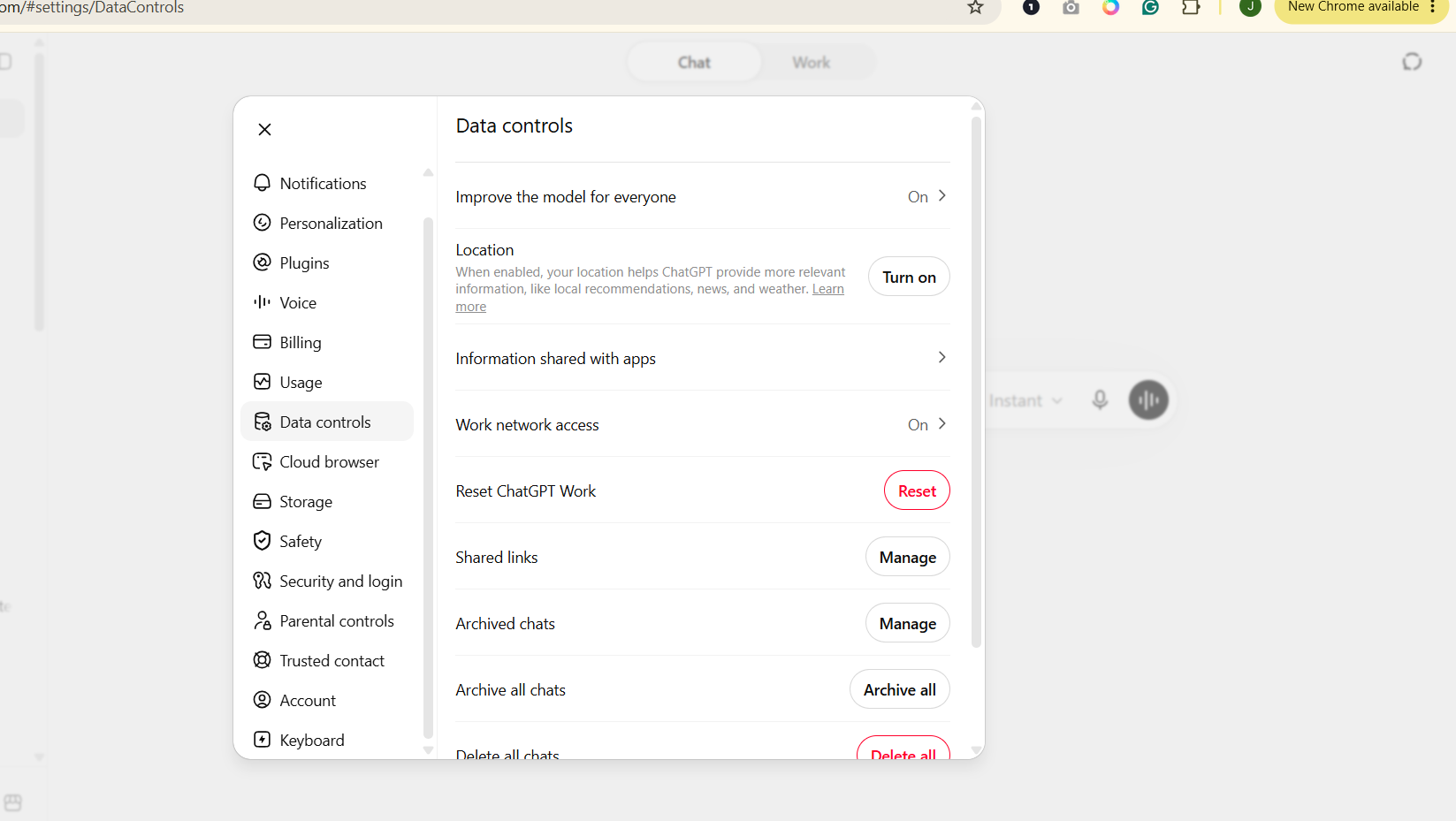
- Stop eligible chats being used for training: Settings, then Data Controls, then switch off ‘Improve the model for everyone'. This affects future conversations only and doesn't remove anything from your existing history.

Turning off ‘Improve the model for everyone’ stops eligible future chats being used for model improvement. It does not delete your existing conversations, which have to be removed separately. - Delete one conversation: directly from your chat history.
- Delete your Memory: managed separately from chat history and the training setting, under Settings, then Personalization.
- Delete uploaded files: check Library and delete any saved files you no longer want stored. Deleting the chat that originally contained a file doesn't necessarily delete the copy saved to Library.
- Export your data: Settings, then Data Controls, then Export Data, if you want a copy before deleting anything.
- Delete your account: Settings, then Data Controls, then Delete Account, which requests removal of your personal data, typically within around 30 days, subject to legal retention exceptions.
What may still be retained?
Turning off training doesn't delete your chat history; the conversations remain until you delete them separately. Temporary Chats are the exception, excluded from history and training from the start, and deleted within 30 days regardless.
How to Delete Claude Data
To delete Claude data, you can change your model-improvement choice, remove individual or all conversations, or delete the account entirely. It's simpler than ChatGPT in a few respects, although its safety-review retention is worth understanding if that's the reason you're deleting something. See Is Claude Safe? for the full detail on Anthropic's retention tiers.
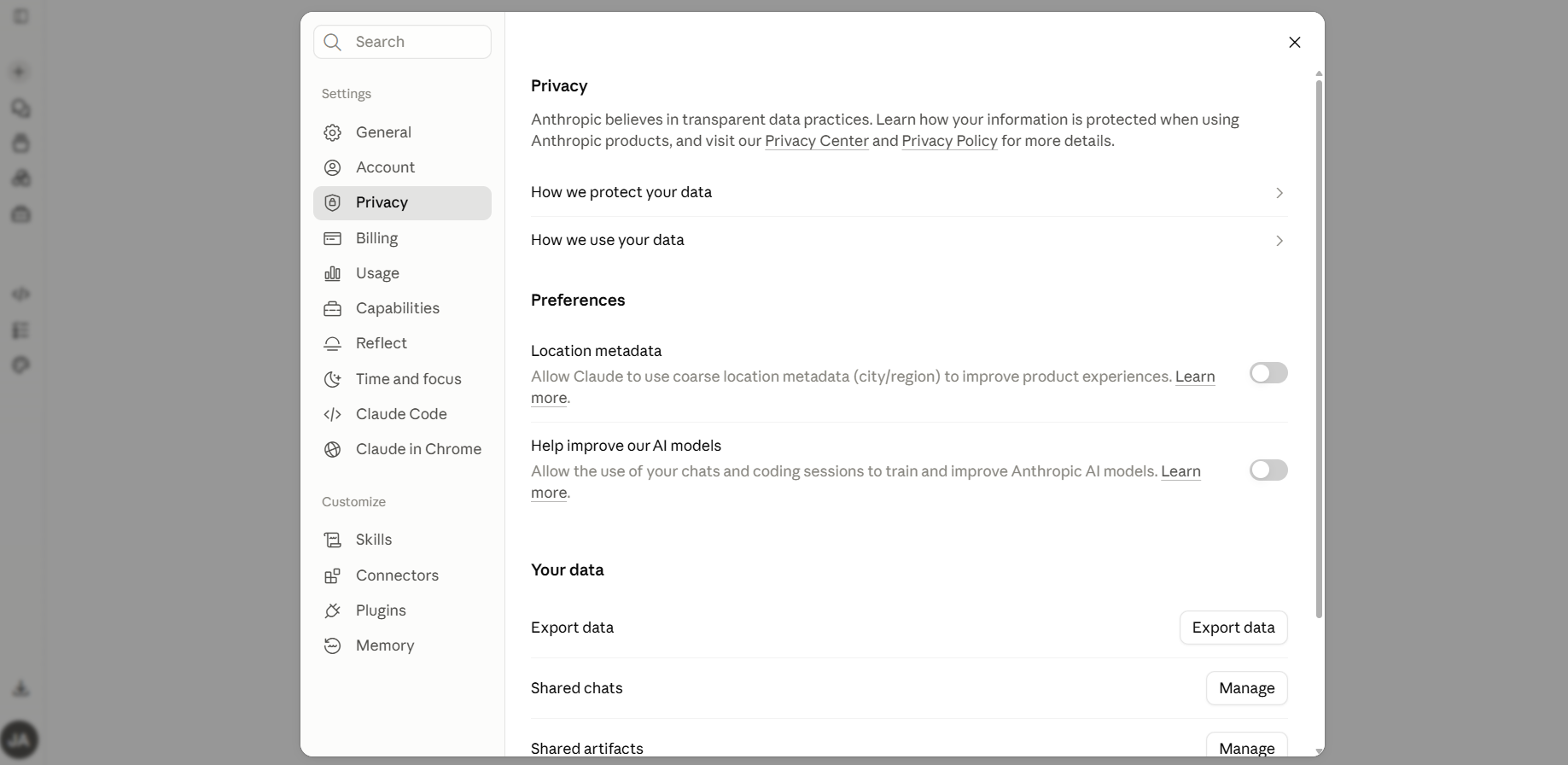
- Change your model-improvement choice: Settings, then Privacy, and switch ‘Help improve Claude' on or off as you prefer.

Claude’s model-improvement setting controls whether ordinary chats can contribute to future model improvement. Changing this setting is separate from deleting conversations or your Claude account. - Delete a conversation: directly from your chat history, or use ‘Delete all conversations' to clear everything at once.
- Delete your account: through account settings. Anthropic states deleted conversations are removed from your visible history immediately and from backend systems within 30 days, subject to the separate retention that applies to flagged Usage Policy violations.
What may still be retained?
Conversations flagged for a Usage Policy violation can be retained for up to two years, with classification scores kept for up to seven years, independent of your general deletion or training choice. If you'd allowed training, data already used in a completed or in-progress training run can't be retroactively removed.
How to Delete Gemini Data
To delete Gemini data, manage your Gemini Apps Activity separately from the Gmail, Drive and other Google data Gemini may have accessed. Slow down before assuming ‘delete' means everything connected to that conversation disappears. Your Gemini activity and the underlying Gmail, Drive or other Google data it may have used are separate. See Is Google Gemini Safe? for why that connection exists in the first place.
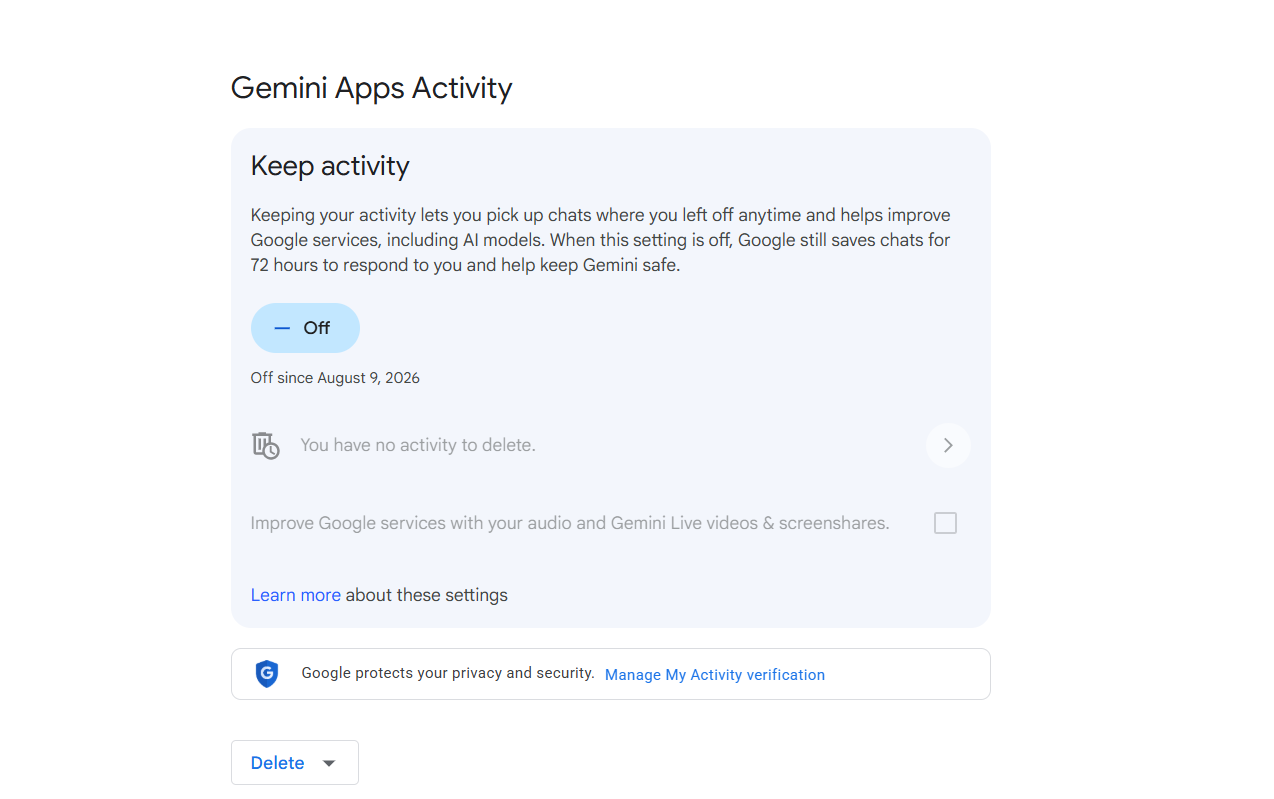
- Turn off Keep Activity: myaccount.google.com, then Data and Privacy, then Gemini Apps Activity, and switch Keep Activity off. Understand this doesn't remove Workspace app integrations you may still want; those simply become unavailable while Keep Activity is off.

Turning Gemini’s Keep Activity off changes future activity handling. It is not the same as deleting existing Gemini activity or removing information stored elsewhere in your Google Account. - Delete existing activity: delete it directly, or set an auto-delete schedule such as three months.
What may still be retained?
Even with Keep Activity off, conversations are saved for up to 72 hours to operate the service. Conversations already reviewed by a human reviewer are retained separately for up to three years and aren't removed by deleting your regular activity. Other Google account data, such as Gmail or Search history, is managed through its own separate settings.
How to Delete Perplexity Data
To delete Perplexity data, remove individual sessions, Projects or files separately, or delete the entire account if you want the associated personal data removed. Perplexity keeps this fairly straightforward across three areas. If you've also filled out Personalization or uploaded project files, remember to review those separately rather than clearing only the visible search thread. One thing worth knowing before you start: if you sign back in during the 30-day window, that automatically cancels the deletion request and reactivates the account, which catches some people out when they log back in just to check it worked. See Is Perplexity Safe? for what Perplexity collects in the first place.
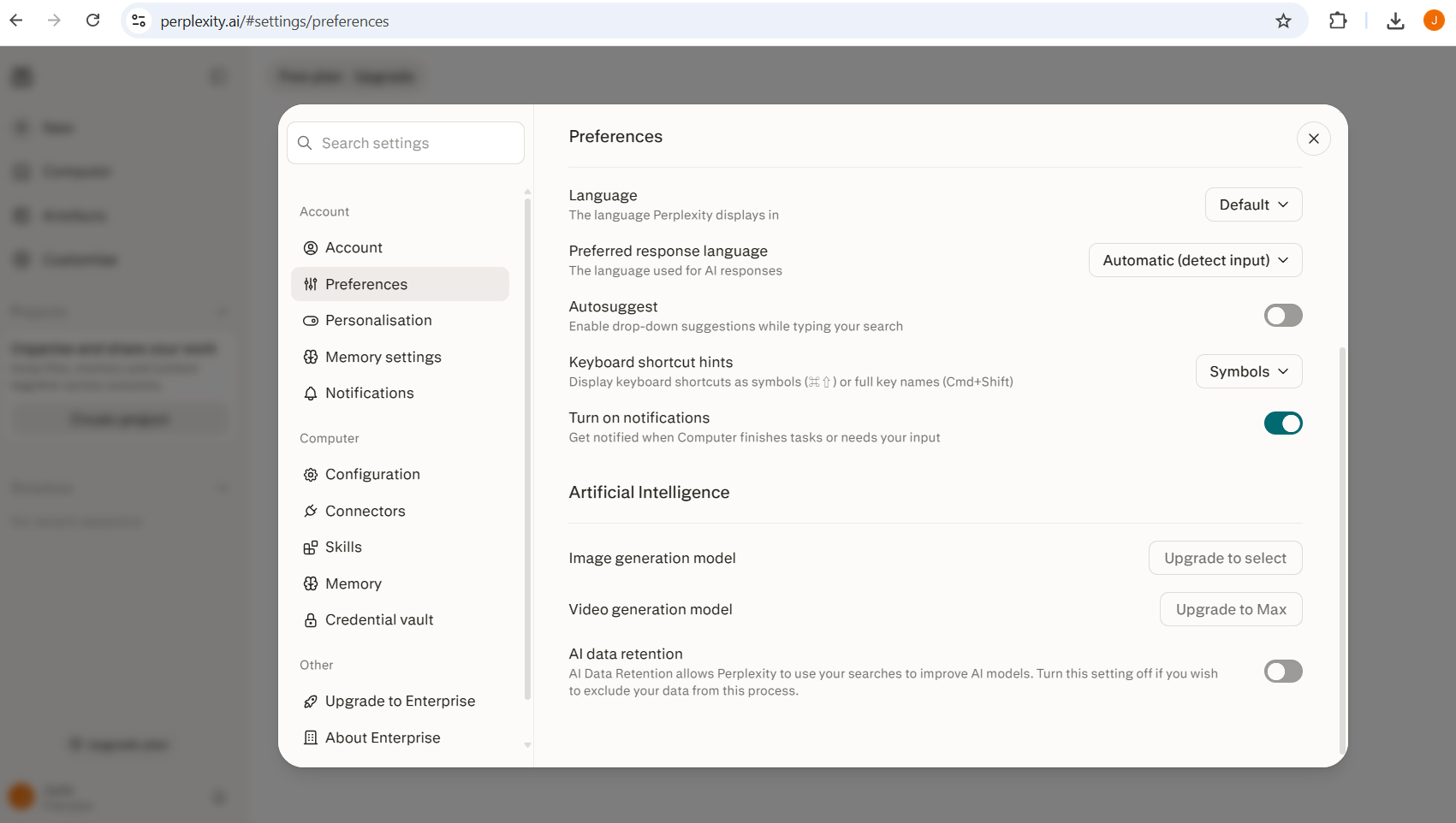
- Turn off AI Data Retention: Account Settings, then Preferences, then AI data retention.

Perplexity’s AI Data Retention control changes whether consumer queries can contribute to model training. It does not delete your existing sessions, Projects, files or account. - Delete a session, project or file: each has its own deletion control within your account.
- Delete your account: through account settings, with personal data stated to be permanently removed after the standard 30-day deletion period.
Does Deleting an AI Chat Remove It From Model Training?
Deleting a conversation can stop that stored chat being used in future training, depending on the provider, but ordinary deletion can't undo a training run that has already incorporated it. If you're deleting a chat because you're worried it may already have contributed to model training, deletion still matters for what happens to the stored conversation going forward, even though it can't reach backwards into a completed training run. This is a common limitation across major providers, though the exact mechanics vary, so check the specific provider's current documentation if this matters to you.
Can You Delete AI Data Under UK GDPR?
UK users can ask an AI company to delete personal data, yes, in qualifying circumstances, under UK GDPR. If the in-app controls don't get you where you need to be, UK users have another route. UK GDPR includes a right to erasure, sometimes called the right to be forgotten, which lets you ask an organisation to delete personal data it holds about you.
When Article 17 may apply
Broadly, when the data is no longer necessary for the purpose it was collected for, when you withdraw consent and there's no other legal basis for the processing, or when you object to the processing and there's no overriding legitimate ground to continue.
When a company can refuse
Common grounds include a legal obligation to retain the data, an active legal claim, or a public interest justification. A provider being under an active legal hold, for example, would be a legitimate reason to decline immediate deletion of specific records.
How to make the request
Use the provider's dedicated privacy request process rather than assuming the in-app ‘delete chat' button covers it. Most major AI providers publish a specific form or email address for this in their privacy policy.
What information to include
Enough to identify your account and the specific data you're asking about, such as your account email and, where relevant, approximate dates or the nature of the content.
Typical response timeframe
Under UK GDPR, organisations generally have one month to respond, extendable by a further two months for complex requests, provided they tell you why.
What to do if you're unhappy with the response
You can complain to the Information Commissioner's Office if you believe a request wasn't handled properly. This is general information, not legal advice; the ICO publishes current guidance on how the right to erasure works in practice, and that's the right place to check anything specific to your situation.
What Should You Do if You Shared Sensitive Data With an AI Chatbot?
If you've shared genuinely sensitive information, deleting the chat is only one part of the response: change exposed credentials, secure affected accounts or follow your organisation's incident process where appropriate.
- Password or security credential: change it immediately.
- Financial credential: secure the account and contact your provider if needed.
- Confidential employer or client data: follow your organisation's incident procedure.
- An ordinary personal detail: delete the chat and move on; this doesn't need to be a crisis.
See the AI Safety hub for more on AI safety, and what information you should never share with AI to avoid the situation next time, Are AI Chats Private? for what actually happens to data before you delete it, and Best Private AI Chatbots if you want a tool with stronger defaults going forward.
How to Delete Your AI Data: The Bottom Line
Don't delete more than you need to because a settings page made the situation feel more complicated than it is.
Work out what you're trying to remove first: one chat, a remembered detail, future training use, uploaded files or the account itself. Then use the control designed for that job. If what you shared was genuinely sensitive, deal with the underlying exposure too. A deleted chat can't change a password for you or notify an employer that confidential data was shared.
Sources and further reading
- ICO: your right to get your data deleted
- OpenAI Help Centre: data controls
- Anthropic Privacy Centre: data deletion and retention
- Google: manage and delete your Gemini Apps activity
- Perplexity Help Centre: account deletion
Settings last checked: August 2026.
