


Last Updated on September 20, 2026 by Jade Artry
Is ChatGPT Safe for Kids? Our Verdict by Age
ChatGPT isn't appropriate for independent use under 13; for teenagers aged 13 to 17, I think it can be used reasonably safely with the right protections, boundaries and parental involvement. It depends heavily on age, more than almost any other AI safety question we cover. These aren't rules I'd apply blindly. Some 14-year-olds will use AI more thoughtfully than some 17-year-olds. The age bands below are simply a useful starting point for deciding how much independence and conversation makes sense in your own family.
| Age | DSS view | Why |
|---|---|---|
| Under 13 | Not for independent use | Outside ChatGPT's intended consumer age range |
| 13 to 15 | Use with clear boundaries and active parental involvement | Greater risk of misplaced trust and oversharing |
| 16 to 17 | Can be useful with increasing independence | Privacy and accuracy limits still apply regardless of maturity |
What Safety Protections Does ChatGPT Have for Teenagers?
The protections ChatGPT gives teenagers are real but limited: it's easy to read a phrase like ‘teen protections' and assume that means ChatGPT becomes a child-safe version of the product. It doesn't. The protections narrow some risks and give parents a few useful controls, but they don't turn the chatbot into a monitored environment.
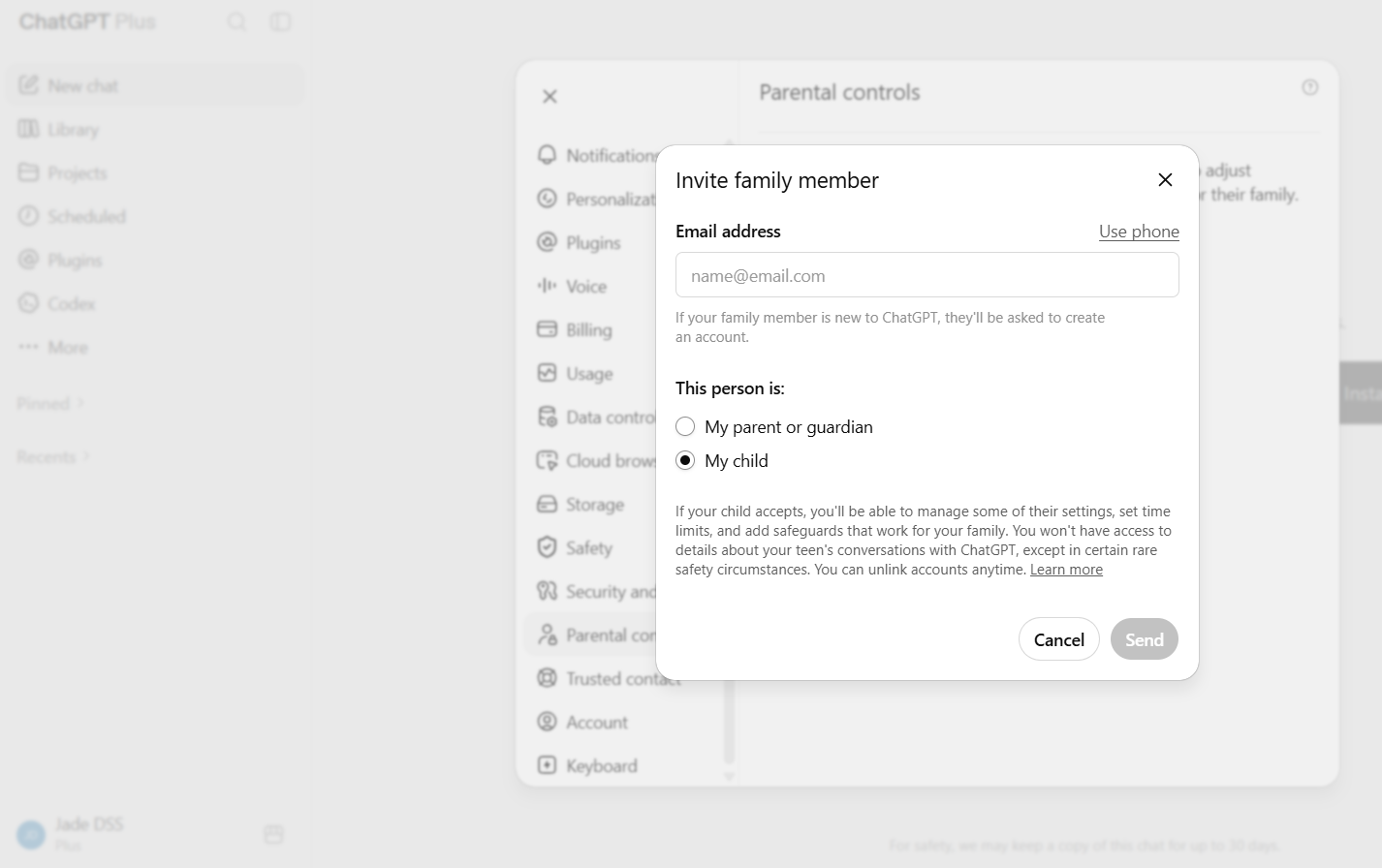
Accounts ChatGPT identifies as likely belonging to someone under 18 may be placed into its teen experience, built around a setting called Reduce Sensitive Content, which is on by default and limits graphic content, viral challenge content, and sexual, romantic or violent roleplay. Parents can link their own account to a teen's, provided the teen is at least 13 and accepts the invitation, which unlocks a specific, limited set of controls rather than full oversight.
What Can Parents See and Control on ChatGPT?
Parents can control sensitive-content filtering, quiet hours, Memory, image and voice access, and model training, but they cannot read their teenager's conversations or watch prompts in real time. That's the distinction that matters most to a parent weighing this up, and it's worth being precise rather than reassuring.
| Parents can | Parents cannot |
|---|---|
| Turn Reduce Sensitive Content off or leave it on | Read their teen's conversations |
| Set quiet hours blocking access during set times | Watch prompts appear in real time |
| Control whether saved memories persist | Receive a transcript of what was said |
| Turn off image generation or voice mode | Guarantee every inappropriate response is blocked |
| Decide whether the teen's chats can be used for model training | See exactly what triggered a safety notification |
| Receive a safety notification in limited, serious situations | Prevent a teen from unlinking the accounts, though you're notified if they do |
I actually think the lack of transcript access cuts both ways, and it's worth seeing it from both directions. Parents don't get invisible access to everything a teenager says, but that also means these controls can't replace the conversations happening outside the app.
How Does ChatGPT Age Verification and Age Prediction Work?
ChatGPT decides whether someone is a teenager using behavioural and account-level signals, such as how long the account has existed, when it's used and the topics discussed, rather than relying purely on a self-reported birthday. Where there's doubt, the system defaults to the more restricted teen experience. Adults who are placed there by mistake can verify their age themselves through the platform's verification flow. Parents can't verify a teen's age on their behalf, only the account holder can.
What Are the Benefits of ChatGPT for Kids and Teenagers?
ChatGPT can be useful for homework explanations, research starting points, language practice, brainstorming, creative projects and making difficult material easier to understand. AI can offer children real value, and the safety question isn't whether to allow that value, it's whether the way your child uses it protects their thinking, their privacy and the human support around them.
A child who's stuck on a maths concept can ask the same question five different ways until it clicks, without the self-consciousness of asking a teacher in front of a class. None of that is a reason to hand a child unsupervised access. It is a reason to think about boundaries rather than a blanket answer of yes or no.
What Information Should Kids Never Share With ChatGPT?
Children should never tell ChatGPT their school name, home address, family finances, passwords, private images, friends' details or family health and conflict information, and this deserves its own short list rather than pointing a child at our general privacy guide, since what matters for a child is narrower and more concrete.
| Never share | Why it matters |
|---|---|
| School name | Combined with other details, identifies where to find a specific child |
| Home address or live location | The single most sensitive detail a child can give away |
| Family financial information | Useful to a scammer, not to a chatbot answering a homework question |
| Passwords | No legitimate reason for any AI tool to need one |
| Private images | Should never be uploaded to any AI service by a child |
| Information about friends | A child can't consent on someone else's behalf |
| Health or family conflict details | Personal and sensitive, better discussed with a trusted adult |
See what information you should never share with AI for the fuller adult version of this list.
What Are the Signs of Unhealthy ChatGPT Use in Children?
The signs that ChatGPT use is becoming a problem are usually gradual rather than sudden, and most children using ChatGPT are fine. What to watch for is less about the tool itself and more about a shift in how your child is using it.
- Using it compulsively, reaching for it constantly rather than when a specific need comes up.
- Turning to it instead of people during genuine distress, rather than as well as them.
- Becoming secretive about conversations they previously would have mentioned.
- Losing confidence in tasks they can no longer do without it.
- Submitting AI-generated work wholesale rather than using it to understand something first.
- Sleep disruption tied to late-night use.
- Believing responses without question, treating ChatGPT's answers as settled fact.
None of these on their own are cause for alarm. A pattern of several together is worth a conversation. See our guide on AI and mental health for more on what emotional over-reliance can look like.
What Should You Do if ChatGPT Gives Your Child Harmful Content?
If ChatGPT gives your child a harmful response, save it if you may need to report it, talk through what happened calmly, review the safeguards and escalate if the content points to a genuine safety concern.
- Capture it if necessary. A screenshot is useful if you want to report the response or discuss it later.
- Talk about what happened calmly, focused on understanding rather than blame.
- Don't treat one bad output as evidence of intent on your child's part. AI tools produce wrong or inappropriate responses without any prompting toward that outcome.
- Review your safeguards, including whether Reduce Sensitive Content and parental controls are actually switched on and linked.
- Escalate appropriately if the content suggests immediate danger, abuse or serious distress, using the route that actually matches the concern. In the UK, that means your GP, school, the NSPCC or CEOP. In the US, NCMEC's CyberTipline is specifically for suspected child sexual exploitation, including online enticement and CSAM; it isn't the right route for other kinds of harmful content.
What Are the Risks of ChatGPT for Kids and Teenagers?
The real risks for children and teenagers are mostly gradual changes in how a child uses the tool, not sudden incidents: trusting it too readily, sharing increasingly personal information, relying on it emotionally, or letting it do more and more of the thinking for them.
Believing confident answers too readily
Children and teenagers are less likely than adults to question a confident-sounding but wrong answer, which matters most for homework, health questions or anything where accuracy genuinely counts.
Oversharing personal information
School, location, family circumstances, health and private conversations can all end up in a chat far more easily than a teenager might realise, since the interface feels conversational rather than like a form being filled in. See what information you should never share with AI for a framework worth teaching a teenager directly.
Emotional reliance
Research from Internet Matters has found around two-thirds of UK children aged 9 to 17 use AI chatbots regularly, with vulnerable children considerably more likely to use them in a companion-like way. See our guide on AI and mental health for the warning signs.
Using AI to replace learning rather than support it
There's a real difference between ChatGPT explaining a concept and ChatGPT producing a finished answer to submit as the teenager's own work.
Which ChatGPT Parental Controls and Safety Settings Should You Use?
The settings I'd check for a teenager are Reduce Sensitive Content, model training, Memory, quiet hours, image generation and voice mode. I wouldn't switch every restriction on simply because it exists. I'd start with the settings that match the concern you actually have, and our guide on how to set age-appropriate AI rules is a useful framework if you're starting from scratch.
- Link accounts if your teen is 13 or older and willing, so you get visibility over safety notifications and can adjust settings together.
- Decide on Reduce Sensitive Content deliberately rather than assuming the default suits your family.
- Review whether chats can be used for model training. This is off by default for linked teen accounts, but worth confirming.
- Set quiet hours if late-night use is a concern.
- Decide on image generation and voice mode based on your teen's age and what feels appropriate.
ChatGPT Rules for Kids: Five Family Safety Rules
My five family rules for ChatGPT are less about controlling the technology and more about giving a teenager a way to judge it for themselves. Our Family Guide to AI and how to talk to your kids about AI friends both go further into these conversations, and the AI Safety hub covers more on AI safety.
- Keep identifying personal information general rather than specific, the same rule that applies everywhere online.
- Verify anything that matters against a second source before treating it as fact.
- Use it to understand, not to skip understanding when it comes to schoolwork.
- Know what to do if a conversation feels uncomfortable, which starts with telling a trusted adult, not hiding it.
- Remember it's a tool, not a replacement for the people in your teenager's life.
ChatGPT vs AI Companion Apps: Which Is Safer for Kids?
ChatGPT is a general-purpose assistant, not a relationship or companion product built around ongoing roleplay, and the risk profile genuinely differs between the two categories.
| ChatGPT | AI companion apps | |
|---|---|---|
| Purpose | General-purpose assistant | Built around ongoing, relationship-style interaction |
| Emotional-attachment risk | Present but secondary to the tool's main use | Central to how the product is designed to be used |
| UK regulatory position | Covered by ChatGPT's own age and teen-protection systems | Largely sits outside the Online Safety Act, since interaction is only between user and bot |
If a companion app is closer to your situation, our guide on AI girlfriends and the risk for kids is the more relevant read.
What Should You Do if You're Worried About Your Child Using ChatGPT?
If you're worried about your child's ChatGPT use, find out how they're actually using it before deciding what to restrict. Ordinary curiosity, inappropriate content exposure, oversharing, homework dependence and genuine emotional distress all call for a different response, and a blanket ban tends to push the behaviour out of sight rather than resolving it. Monitoring software isn't the automatic first answer here. A calm, direct conversation usually gets further.
Nick, my co-founder at DSS, is our lead parental-controls tester and has two daughters of his own, so a lot of what's in this guide comes from settings he's actually gone through at his own kitchen table, not just documentation. As a dad, the thing he pushes hardest on isn't any single setting, it's making sure his girls know they can bring him something an AI said that felt wrong, without worrying they'll lose the account over it. That's the world he's actually preparing them for, not one he's managing yet, and it shapes how we write every family guide on this site.
Is ChatGPT Safe for Kids? Our Final Verdict
For an under-13, I wouldn't set them up with an independent account. For a teenager, I wouldn't treat ChatGPT as something that has to be banned either.
I'd want the age protections in place, I'd go through the settings with them, and I'd care far more about whether we could talk openly about how they were using it than whether I could see every conversation. The settings help. The relationship around them matters more.
- OpenAI Help Centre: Parental controls in ChatGPT
- OpenAI Help Centre: Reduce sensitive content
- OpenAI Help Centre: Age prediction
- Internet Matters: research on children and AI chatbot use
Settings last checked: August 2026.
