



Last Updated on September 19, 2026 by Nick Francis
Quick points
At a glance
Discord's minimum age is 13, and the platform isn't designed for younger children, though many use it anyway by entering a false date of birth.
The biggest risks aren't the platform itself but how it's used, including strangers in servers, direct messages from people your child hasn't met, voice chat with no record, and pressure to move conversations to other apps.
AI has made some of these risks harder to spot than they used to be, particularly in voice chat and in messages designed to mimic a friend.
Discord's own Family Center can show you who your child talks to and what servers they join, but it cannot show you the content of any messages.
The most useful single action you can take is to sit down with your child, link Family Center together, and review their privacy settings as a conversation rather than a check.
If something has already happened, you don't need to handle it alone. CEOP and Discord's in-app reporting both exist for exactly this.
AI has changed what's possible online faster than any of us have had time to keep up with, and the risks on a platform like Discord aren't only the ones you'd expect anymore. None of that means Discord is hopeless, or that you've missed something you should have caught sooner. It just means the advice has had to catch up with the reality, and this guide is built around the reality of 2026, not the one from five years ago.
What Is Discord?
Discord is a chat platform that lets people talk to each other through text, voice and video, usually inside online communities called servers. It started out as a tool for gamers, and that's still where most of its activity sits, but it's grown into something closer to a hybrid of WhatsApp, Reddit and a group voice call all in one app.
What makes Discord different from a more familiar app like WhatsApp is that it isn't only about people your child already knows. It's built around joining communities of strangers, by design. That isn't sinister on its own, and most servers are run perfectly responsibly by the people in them. But it is the thing most parents underestimate when they first hear the name, because nothing about the way Discord is described matches the way they're used to thinking about messaging apps.
Discord is free to use, with a paid subscription called Nitro that adds extra features. The platform has over 200 million monthly active users globally as of 2026, and a large share of those are teenagers.
How Discord Works
Discord works through three main features that, between them, account for most of what your child is doing on the platform: servers, direct messages, and voice chat. Once you can picture each of these, the rest of the platform becomes much easier to follow.
Servers are the heart of Discord. A server is a community with its own channels (sub-rooms inside the server), members and rules. Anyone with a link to a server can usually join it, which means a child can move from a small server with three school friends to a server with 100,000 strangers in the space of one shared invite. Some servers are gaming-focused, some are themed around YouTubers or interests, and some are general chat rooms. The quality, moderation and tone of each one varies wildly.
Direct messages, or DMs, are private one-to-one or group chats between users. These work much like any other messaging app, except the people in them may have met through a public server rather than in real life. DMs aren't visible to other server members, and they can be deleted by either party, leaving little trace.
Voice chat happens in voice channels inside servers, or as direct calls between users. Voice chat isn't recorded and isn't visible to anyone who isn't in the channel at the time. This is the feature parents most often miss when checking a phone, because there's no message trail to find afterwards. It's also the feature where AI voice cloning has become a genuine concern, because a child can't always tell whether the voice on the other end is actually who it claims to be. Our guide on how to detect AI-powered phishing attacks goes deeper into how convincing these voices have become, and what to listen for.
What Is Discord Used For?
Discord is used most often for talking to friends while gaming, but it's increasingly used for plenty of non-gaming things too, including study groups, fandom communities, friendship circles, hobby spaces, school clubs, and even some university societies. For many teenagers, Discord has become the main way they communicate with friends, in much the same way previous generations used MSN, then Facebook chat, then WhatsApp.
The crossover with gaming is still where most parents first encounter it. A child might play Fortnite, Minecraft, Valorant or Roblox and use Discord on a second screen to talk to friends while they play. A conversation might start inside a game and continue on Discord afterwards, which is part of why Discord can feel hard to keep track of from the outside.
Children are drawn to Discord for reasons that, on reflection, are pretty understandable. It feels private without feeling lonely. It's where their friends are. It works the way they expect a modern app to work, with voice, video, group chats and shared servers all in one place. For a teenager whose social life is partly online, being told they can't use Discord can feel like being told they can't use the phone, because for them, it functions like one. That's worth understanding before deciding what to do about it, because the social pull is genuine and won't disappear just because a parent wants it to.
Part of why Discord doesn't quite fit the shape of any other app you might know is that it sits somewhere between social media and private messenger. It isn't quite TikTok and it isn't quite WhatsApp. That in-between space is exactly why it's become so popular with young people.
Is Discord Safe?
Discord can be safe for older teenagers when it's set up properly, and it really isn't safe for children under 13. The honest answer is that Discord sits in the middle of the safety spectrum for teenagers, less risky than open chat platforms like Omegle or unmoderated forums, but more risky than closed messaging apps like WhatsApp or iMessage, simply because it's built around joining communities of strangers rather than talking to people you already know.
The platform itself isn't the problem. The risks come from how it's used, including who can message your child, what servers they end up in, whether voice chat is happening with strangers, and whether conversations are being pulled off Discord onto apps you have even less visibility on.
A few things have shifted in Discord's favour recently. From 2026, Discord operates teen-by-default for users aged 13 to 17, with stricter privacy settings turned on automatically. Message requests from non-friends are filtered into a separate folder by default, which keeps unsolicited contact out of the main inbox. The Family Center feature, expanded in November 2025, gives parents visibility into who their teen is talking to and which servers they've joined, although it doesn't show the content of any messages. And in the UK, the Online Safety Act now requires Discord to meet specific duties of care around children, including age assurance for guardian-managed settings.
What's also shifted, in the opposite direction, is AI. Predators and scammers now have access to tools that didn't exist three years ago, including real-time voice cloning, AI-generated images and chatbots that can hold convincing conversations. The platform is safer in some structural ways than it used to be, and harder to keep children safe on in others. Both of those things are true at the same time.
The realistic answer by age is something like this. Under 13: not safe, not designed for them, not appropriate. 13 to 15: usable with proper setup, ongoing conversation, Family Center linked, and a clear understanding of what to do if something goes wrong. 16 to 17: usable with most teen protections active, lighter parental involvement, and your child understanding the risks themselves. The setup matters more than the age.
If your child is a teenager already using Discord, you don't have to panic and you don't have to take it away. What helps is understanding how it works, linking Discord's Family Center to your account, turning on the safety settings most parents miss, and making sure your child knows they can come to you if anything ever feels wrong. The rest of this guide walks through it calmly.
If you'd like a broader look at the risks teenagers face across all platforms, our guide on the hidden dangers of social media covers sexting, bullying and the other adjacent issues that often appear alongside Discord use.
What Are the Risks of Discord for Children?
The risks of Discord for children fall into a handful of specific categories, and understanding each one separately makes the platform much less overwhelming to think about. None of these things makes Discord uniquely dangerous. They do make it different from the apps you might already be familiar with, and that difference is usually what's sitting underneath the unease.
Stranger contact through servers
Stranger contact is the most common risk on Discord, and the one most parents are right to worry about first. Because servers are built around shared interests rather than existing relationships, children frequently end up in chats with adults they've never met. In a server with 50,000 members, your child might be the only 13-year-old in a room full of adults. Most of those adults are harmless. A small number are not, and the platform's structure makes it easier for them to start a conversation than on more closed apps.
By default, anyone in a server with your child can send them a direct message, see their username, and view their profile. Discord's teen-by-default settings filter unsolicited DMs into a message requests folder, but this only protects accounts registered as teens. A child who set their age to over 18 to bypass restrictions has no such protection.
Off-platform pressure
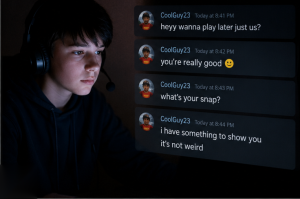
Off-platform pressure is when someone your child meets on Discord suggests moving the conversation to another app, often Snapchat, Telegram, Signal or a private gaming server. This is one of the patterns most consistently flagged by online safety organisations as a potential grooming step, because it moves the conversation somewhere harder for parents to see and where messages often disappear automatically.
Off-platform pressure doesn't always mean grooming. Plenty of teenagers move conversations off Discord simply because they prefer the features of another app, or because their friends are on Snapchat. But when someone your child has never met in person starts pushing for that move quickly, or insists on it after only a few conversations, it's worth paying attention to. It's also worth your child knowing that this pattern exists, so they can recognise it themselves rather than relying on you to spot it for them.
Voice chat with no record
Voice chat is the feature parents have least visibility on, and the one children use most heavily. Discord voice channels and direct voice calls aren't recorded, aren't transcribed, and leave no message trail. If your child wears headphones while gaming, voice chat is most likely what they're using.
The risk isn't voice chat itself. Most voice chat on Discord is teenagers messing about with their friends. The risk is that there's no way to know retrospectively who your child was speaking to or what was said. If something happened in voice that worried them, you're entirely reliant on them telling you about it. That's why the conversation matters more than the surveillance does on this particular feature.
Harmful and extremist content
Discord servers can host explicit, extremist or harmful content, and some are deliberately built to expose children to material they shouldn't see. Discord has been linked publicly to incidents involving radicalisation, self-harm communities, eating disorder content and sexual extortion rings.
This doesn't mean every server is dangerous. The vast majority are fine. But the platform's open server discovery, combined with link-sharing across gaming and social media, means a child can land in a harmful server with very little effort. The teen-by-default content filter helps, but it isn't a guarantee.
AI-driven manipulation and voice cloning
AI-driven risk is the category that's shifted most in the last two years, and the one many parents haven't yet caught up with. Predators and scammers are now using AI to write more convincing messages at scale, to clone voices in real time during voice chat, to generate fake images and to mimic friends or family members.
The practical implication is that some of the old warning signs (poor grammar, generic phrasing, scripts that don't quite fit) have become much less reliable. A message that looks like it's from a teenager their own age might not be. A voice that sounds like a friend, in a Discord call, might not be. Our guides on AI chatbots and the hidden dangers and what to do if your child is talking to a chatbot cover the wider picture of how AI is changing what children are exposed to online.
The single best protection against AI-driven manipulation isn't technical. It's your child knowing the pattern exists, and knowing they can come to you if something feels off, even if they can't put their finger on why.
Financial scams and account theft
Financial scams on Discord typically target gaming accounts, in-game currency, gift cards or Discord's own paid features. Common patterns include fake Nitro giveaways, free Robux scams that ask for account login details, fake gaming developers offering early access, and impersonation of a friend asking for help. Some scams are simple enough to spot. Others are sophisticated and tailored, especially with AI tools now able to mimic a real friend's writing style.
The financial side of Discord also includes legitimate spending in the Discord Shop and on Nitro subscriptions, which can mount up quickly without parents noticing. Family Center now shows total purchases over the last 7 days, which helps catch this earlier than it used to be caught.
Discord Red Flags Parents Should Not Ignore
Discord red flags parents should not ignore tend to fall into a few clear patterns, usually around secrecy, sudden new contacts, and conversations being moved off the platform. The signs below aren't meant to make every late-night gaming session feel sinister. They're the patterns that, when they appear together or escalate, tend to mean something is worth a calm conversation.
Signs worth paying attention to:
- Suddenly hiding the screen when you walk into the room, more than typical teenage privacy
- A new server, friend or contact your child seems unwilling to talk about
- Conversations that appear to have moved off Discord to Snapchat, Telegram or text
- Gifts, gaming currency or items appearing without an obvious source
- Late-night voice chat with people they haven't met in person
- Distress or withdrawal after time spent online
- A second account they haven't told you about
- A new ‘friend' who seems to know an unusual amount about your child, or whose messages feel polished in a way that doesn't quite match their claimed age, which can be a sign of AI-assisted grooming
- Unexpected charges or new Discord Shop purchases you didn't approve
If your child has started using Discord alongside other apps you can't easily see, our guide to finding hidden apps on a child's phone is a useful companion.
Any one of these in isolation isn't necessarily a problem. A pattern of several together is what's worth taking seriously, and taking it seriously starts with a conversation, not a confiscation.
What Discord Family Center Shows Parents
Discord Family Center shows parents a 7-day summary of their child's activity, and it's worth knowing exactly what's in that summary because most parents assume it shows more than it actually does.
Once your child has linked you as a guardian, Family Center shows:
- Recently added friends, including display names and avatars
- Servers your child has joined in the last 7 days
- Users your child has messaged or called, including names and times
- Top five users and servers by activity
- Total voice and video call minutes
- Active servers
- Total purchases from Discord Shop and Nitro in the last 7 days
- A weekly email summary sent to your registered address
In the UK specifically, the Online Safety Act now requires parents using guardian-managed settings to be age-verified adults aged 18 or over, and to complete age assurance before adjusting certain settings such as message requests. This is a recent change and means setup may take slightly longer than it would have a year ago, but it's a one-off step.
What Discord Family Center Does Not Show
Discord Family Center does not show parents the content of any conversations, and this is the part most families are surprised by. It's worth being completely clear about what's not visible to you, because the gap between what parents expect and what Family Center actually offers is often where false reassurance can creep in.
Family Center does not show:
- The content of any messages your child sends or receives
- The content of any voice or video calls
- Anything older than 7 days
- Activity from before you linked the account
- Anything at all if your child disconnects you, which they can do at any time
The honest framing of Family Center is that it's closer to teen oversight than full parental control. It's designed to support conversations between you and your child, not replace them. That's a deliberate choice on Discord's part, and there are reasonable arguments for and against it. It's also the reality of what you're working with, which is why so many families pair it with other tools. Our guide to parental monitoring apps versus stalkerware is also worth a read if you're trying to work out what's appropriate to use alongside Family Center and what crosses a line.
What To Do If Something Has Already Happened
If something has already happened on your child's Discord, the first thing to do is breathe, not delete anything, and save evidence before you take any other action. The instinct to delete the conversation, confront whoever sent it, or take the phone away entirely is completely understandable. None of those is your first move, because the evidence matters and your child's sense of safety with you matters even more.
The right steps depend a little on what's happened. Here are the most common scenarios.
If a stranger has been contacting your child
Save screenshots of all messages, including the username and any servers you share with that person. Use the block and report functions inside Discord. If the person has been asking for photos, suggesting they meet up in person, or showing any sexual interest in your child, report to CEOP immediately. You don't need to be sure it's grooming to report it.
If your child has been groomed or pressured
Stay calm with your child, even if what they're telling you is alarming. They may already be feeling shame, fear or confusion, and the way you respond shapes whether they tell you anything else. Don't delete the conversation. Save screenshots of everything, then report to CEOP. Speak to your child's designated safeguarding lead at school if relevant. The NSPCC helpline is genuinely useful for parents in this situation.
If your child has fallen for a scam
If a Discord scam has taken money, account details or gaming currency from your child, act quickly. Change the password on any accounts that were compromised, including the email address linked to those accounts. Enable two-factor authentication on Discord and on any gaming accounts. Contact the relevant game's support team to report theft. If real money has been taken, report to Action Fraud and contact your bank to dispute the charge.
If your child has sent something they regret
If your child has sent intimate images, personal information or anything else they now regret, reassure them first. It happens more often than parents realise, and a panicked reaction often makes things harder. For intimate images, our guide on what to do if your teen is targeted by sextortion walks through the specific steps. The Internet Watch Foundation's Report Remove tool can help get intimate images of under-18s removed from the internet. The recipient should be blocked and reported on Discord. CEOP should be informed if the recipient is an adult.
If your child's Discord account has been hacked
If your child's Discord account has been hacked, the priority is regaining control before the hacker can use it to scam friends or post harmful content. Reset the password if you still have email access. Enable two-factor authentication. Contact Discord support to report the compromise. Check whether any other accounts linked to the same email have been affected, and change those passwords too. Warn your child's friends, because hacked accounts are often used to send scam links to contacts.
General principles for any situation
Across all of these, a few things hold true.
- Save evidence first. Screenshots of usernames, messages, server names, server IDs and any links shared. Use a separate device if you can, so nothing is lost if the original is reset or wiped.
- Don't delete anything. Even if your instinct is to wipe it, the evidence matters for any report.
- Block and report inside Discord. Discord's Trust and Safety team handles these reports and can act on accounts and content.
- Speak to your child without blame. Whatever has happened, they may be embarrassed, frightened, or convinced it was their fault. It almost never is. The way they're treated in this conversation will shape whether they come to you the next time, so the goal is for them to feel safer, not smaller.
- Get support for yourself too. Internet Matters, the NSPCC and the Lucy Faithfull Foundation all have helplines for parents in this situation. You don't have to handle this on your own, and a quick call doesn't commit you to anything.
Most situations don't need every one of these steps. But knowing they exist makes the first hour feel less like freefall. Your calm in that first hour is the single most useful thing you can offer your child.
How to Keep Your Children Safe on Discord
Keeping your children safe on Discord comes down to three things working together: turning on the right settings, agreeing the right rules, and adding the right tools where they help. None of these on its own is enough. All three of them, combined with open conversation, is what actually works.
Discord Parental Controls: Settings to Check Today
Discord parental controls settings to check today include the direct messages filter, friend request restrictions, who can send DMs, and the list of servers your child has joined. Working through these together with your child tends to land better than going behind their back to change them. You get the same result, with their trust intact, which is what you actually need them to bring to you when something feels off. Our guide on how to talk to your kids about online safety covers the conversation side of this in more detail, particularly the balance between monitoring and trust.
- Set the safe direct messages filter to its highest level. This filters out messages with explicit content. Found under Privacy & Safety.
- Restrict who can send friend requests. The most protective option is ‘Friends of friends'.
- Restrict who can send direct messages. Turn off the option allowing server members to DM your child by default.
- Block direct messages from server members on a per-server basis for any server where your child doesn't know most of the members personally.
- Turn off displaying age publicly. Discord shouldn't show your child's age in their profile.
- Link Family Center together. Both accounts need to opt in. Setup is done from the mobile app.
- Review the existing servers. Look at the list of servers your child has joined and have a conversation about what each one is for and who else is in it.
For device-level settings that sit underneath Discord and apply across other apps too, our walkthrough on how to set up parental controls on iPhones, Androids and home devices covers the wider setup most families need to do alongside this.
Setting Rules and Boundaries
Setting rules and boundaries around Discord works better when they're agreed with your child rather than imposed on them, and when they're realistic enough to stick to. A rule that gets broken on day three teaches your child to break rules. A rule that's been talked through, understood and agreed has a much better chance of holding.
Useful rules to consider:
- Which devices Discord can be used on, and which it can't (no Discord in bedrooms overnight is a common one)
- Time-of-day boundaries, including no voice chat after a certain hour
- A rule that voice chat with anyone they haven't met in person needs to be talked about first
- A rule that any request to move conversations off Discord gets flagged to you, no questions asked
- An agreement that Family Center stays linked, and that if it gets disconnected, that's a conversation rather than a fight
- Clarity on what your child should do if something happens, including knowing they won't lose Discord altogether for telling you
Our guide on how to create healthy family technology rules goes deeper into building agreements that actually stick. The most important rule of all is that they can come to you about anything they see on Discord without being punished for it. If the only way to keep using Discord is to hide things, they'll hide things. If telling you is safe, they'll tell you.
When Parental Control Apps Can Help
Parental control apps can help when Discord's own settings reach their limits, especially if you want visibility across all your child's apps rather than just one, or if your child is younger than the standard teen protections account for. There's no app that fully solves Discord, and any product page claiming otherwise is overselling. What parental control apps do well is cover the parts Discord's own settings can't quite reach. They work best as a layer on top of conversation, not a replacement for it.
Families tend to look for additional tools when:
- A child has multiple accounts, including possible hidden ones
- They want device-level visibility across other apps too
- They're particularly worried about content shared in voice or in deleted messages
- Their child is younger and the standard teen protections don't apply
- They want alerts for concerning language patterns, not just activity logs
The apps families tend to find most useful in this space sit at slightly different price points and serve different needs. Bark is strongest for monitoring across apps with concerning-language alerts, which is useful for catching the off-platform pressure or grooming language Discord's own Family Center can't see. mSpy offers broader device-level monitoring, including app use patterns and content controls. Aura bundles parental controls with identity protection, which is particularly relevant given the rise in account theft and AI-driven scams targeting children. None of them can see inside Discord messages directly, but they can show app use patterns, screen time, and in some cases flag worrying behaviour signals.
Our roundup of the best parental control apps in 2025 compares them in detail, and our piece on how to choose the right parental control app for your parenting style helps narrow it down based on what actually matters in your household. If you're wondering whether they make a difference at all, do parental control apps work? shares insights from real families.
The most reliable protection is still your child knowing what to do, and trusting you enough to tell you when something happens. The tools support that. They don't replace it.
Should Parents Ban Discord or Set Boundaries?
Whether to ban Discord or set boundaries around it depends mostly on your child's age, and for most teenagers, setting boundaries works better than banning the app outright. For younger children, particularly those under 13, banning is the more straightforward choice because Discord isn't designed for them and the teen protections won't apply. For teenagers already using Discord as part of their friendships and gaming, an outright ban often pushes the activity somewhere harder to see, whether that's a friend's phone, a secondary account, or a different platform you've never heard of. Which is the opposite of what you wanted.
The more durable approach for most families is the one this guide has been building towards: settings turned on, rules agreed together, Family Center linked, parental control apps where they help, and an open conversation underneath all of it. None of that is foolproof, and any parent who tells you they have it all worked out is either very lucky or not paying close enough attention. But it's the approach most likely to give you visibility without breaking trust, and to give your child the resilience to handle the bits of the internet you can't see for them.
If you take one thing from this guide, let it be this: your child being on Discord doesn't mean you've failed. Almost every teenager in the UK is on it, or will be soon. What matters is that they know how it works, what to watch for, and that you're the person they come to when something feels off. That's the protection that lasts long after they've outgrown anything you can set up for them.
Frequently Asked Questions
Is Discord dangerous?
Discord isn't categorically dangerous, but it has specific risks worth understanding, particularly stranger contact through servers, voice chat that leaves no record, and pressure to move conversations to other apps. Knowing these risks and adjusting the settings around them reduces their reach considerably.
How do I check if a Discord link is safe?
To check if a Discord link is safe, treat any unexpected link with caution, especially shortened links or links to download something, particularly when shared by someone your child doesn't know well. Discord is sometimes used to share phishing links targeting gaming accounts, of the kind covered in our guide on how fake Robux and gaming currency scams work. If a link looks suspicious, don't click it. You can verify links by hovering to see where they actually lead, or by checking the domain on a service like VirusTotal before opening.
Should I delete Discord from my child's phone?
Whether to delete Discord depends on your child's age. For a child under 13, yes, the app shouldn't be on the phone. For a teenager already using it for friendships, deleting it tends to push the activity somewhere harder for you to see rather than ending it. The more durable approach is open conversation, the safety settings above, and Family Center linked. Our guide on how to talk to your kids about online safety can help with that conversation.
What should I do if a stranger has contacted my child on Discord?
If a stranger has contacted your child on Discord, save the evidence first by screenshotting the messages and profile, then block and report the account inside Discord. If the person asked for photos, suggested meeting, or showed any sexual interest, report to CEOP in the UK, or the NCMEC CyberTipline in the US. Our guide on what to do if a stranger contacts your child while gaming walks through every step.
What is a Discord server?
A Discord server is a private or public space where people gather to chat by text, voice or video, usually organised around a shared interest like a game, a school group or a fandom. Anyone can create one for free, and they can be invite-only or open for anyone to join. The thing for parents to know is that large public servers can put your child in the same space as thousands of strangers, whereas a small private server of real-life friends is much lower risk. Encouraging your child to stick to private servers with people they actually know is one of the simplest safety steps.
What are free Discord Nitro scams?
Free Discord Nitro scams are fake offers of Nitro, Discord's paid subscription, used to steal account logins. A scammer sends a message promising free Nitro with a link to ‘claim' it, but the link leads to a fake login page that captures your child's username and password the moment they type them in. It's one of the most common ways children's Discord accounts get hacked. Teach your child the simple rule that nobody gives away free Nitro, and that any link promising it is a scam, however official it looks.
Should my child only use private Discord servers?
Yes, private servers with real-life friends are the safest way for a child to use Discord. Large public servers are where most stranger contact and exposure to inappropriate content happens, because anyone can join and they're often moderated only by bots or volunteers who miss things. A small invite-only server of people your child actually knows keeps the social side they enjoy while removing most of the risk. It's worth agreeing this as a household rule rather than trying to police every server individually.
