


Last Updated on September 19, 2026 by Jade Artry
What Data Does Google Gemini Collect About You?
Beyond the chat window, Gemini knows your account information, Gemini activity, connected Google services, location where enabled, uploads and human-reviewed conversations. It helps to see the full picture rather than the one-paragraph version.
- Account information: your Google Account details and any subscription tied to it.
- Gemini activity: your conversations, saved or not depending on Keep Activity.
- Wider Google service context: whatever Connected Apps you've allowed, covered in detail below.
- Location: where enabled, either through device permissions or account-level location history.
- Uploads and images: documents and photos you share directly in a conversation.
- Feedback and human-reviewed conversations: retained separately, as covered above, for up to three years.
What Data Can Gemini Access Through Connected Apps?
When enabled, Gmail lets Gemini work with email content, Drive with your documents, Calendar with schedule information and Maps with location-aware context. This is where the page's central idea becomes something you can actually act on, rather than an abstract observation about ecosystems.
| Connection | What Gemini may use it for | What I'd consider |
|---|---|---|
| Gmail | Reading and drafting emails, summarising threads | Genuinely useful if you email Gemini requests often; disconnect if you don't |
| Drive | Referencing and summarising your documents | Worth keeping if you regularly ask Gemini about your own files |
| Calendar | Checking availability, drafting invites | Low-risk for most people; convenient more often than not |
| Maps | Location-aware answers and directions | Consider disconnecting if you'd rather Gemini not see where you go |
| YouTube and other supported services | Varies by feature and is still expanding | Check what's currently connected under Connected Apps directly, since this list changes |
What Happens to Photos and Documents You Upload to Gemini?
Uploading a photo or document to Gemini doesn't change the underlying rules, but it does change the amount of incidental information at risk, since a photo or document usually carries more than the text of your question alone. Uploaded images and documents are handled under the same Keep Activity and training rules as typed conversations, but they carry more incidental information than text alone, including metadata in a photo or formatting and comments in a document. Treat an upload with at least as much caution as you would a typed question containing the same information, and see what information you should never share with AI before attaching anything you haven't checked.
Which Gemini Connected Apps Should You Turn Off?
What I'd disconnect first is anything I never actually ask Gemini to use, though this isn't universal advice since the right answer depends entirely on what you use Gemini for. My own rule: I'd remove anything I never actually ask Gemini to use. If you've never once asked Gemini a Maps-related question, that connection is pure exposure with no offsetting convenience. If Gmail integration is the entire reason you reach for Gemini, keeping it connected and shortening your retention window is a more sensible trade than switching it off entirely.
Google Gemini Consumer vs Workspace: Which Is More Private?
Consumer Gemini follows personal-account controls such as Keep Activity, while eligible Workspace deployments add separate enterprise data protections and administrator controls.
| Consumer Gemini | Gemini for Workspace | |
|---|---|---|
| Training default | On via Keep Activity | Excluded outside your organisation |
| Who controls settings | You | Your organisation's administrator |
| Typical use | Personal, everyday tasks | Work tasks involving company or client data |
What Is Gemini Keep Activity and Should You Turn It Off?
Gemini Keep Activity is the setting that controls whether your conversations are saved to your Google Account and used to improve Google's services, including its AI models; I'd turn it off unless the Google integration is genuinely useful to you. If you only check one Gemini privacy setting, make it this one, since it also affects whether some of Gemini's most useful Google integrations work.
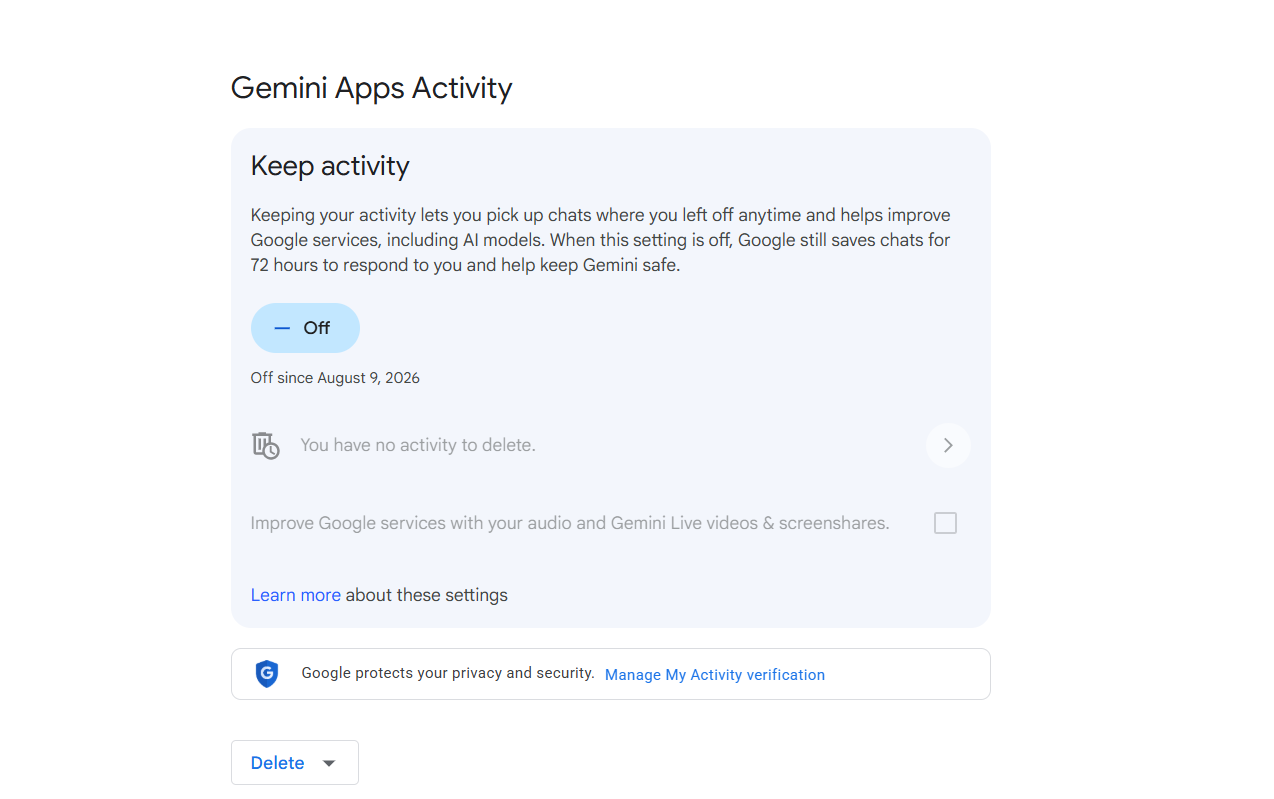
When Keep Activity is on, your Gemini conversations are saved to your Google Account according to your activity settings, defaulting to 18 months, and may be used to improve Google's services, including its AI models. When Keep Activity is off, future chats aren't added to your visible activity and aren't used to train Google's AI models unless you submit feedback, but Google still retains those chats for up to 72 hours to provide the service and process any feedback. That 72-hour operational retention still applies when Keep Activity is off, so switching the setting off doesn't mean future chats immediately cease to be stored anywhere.
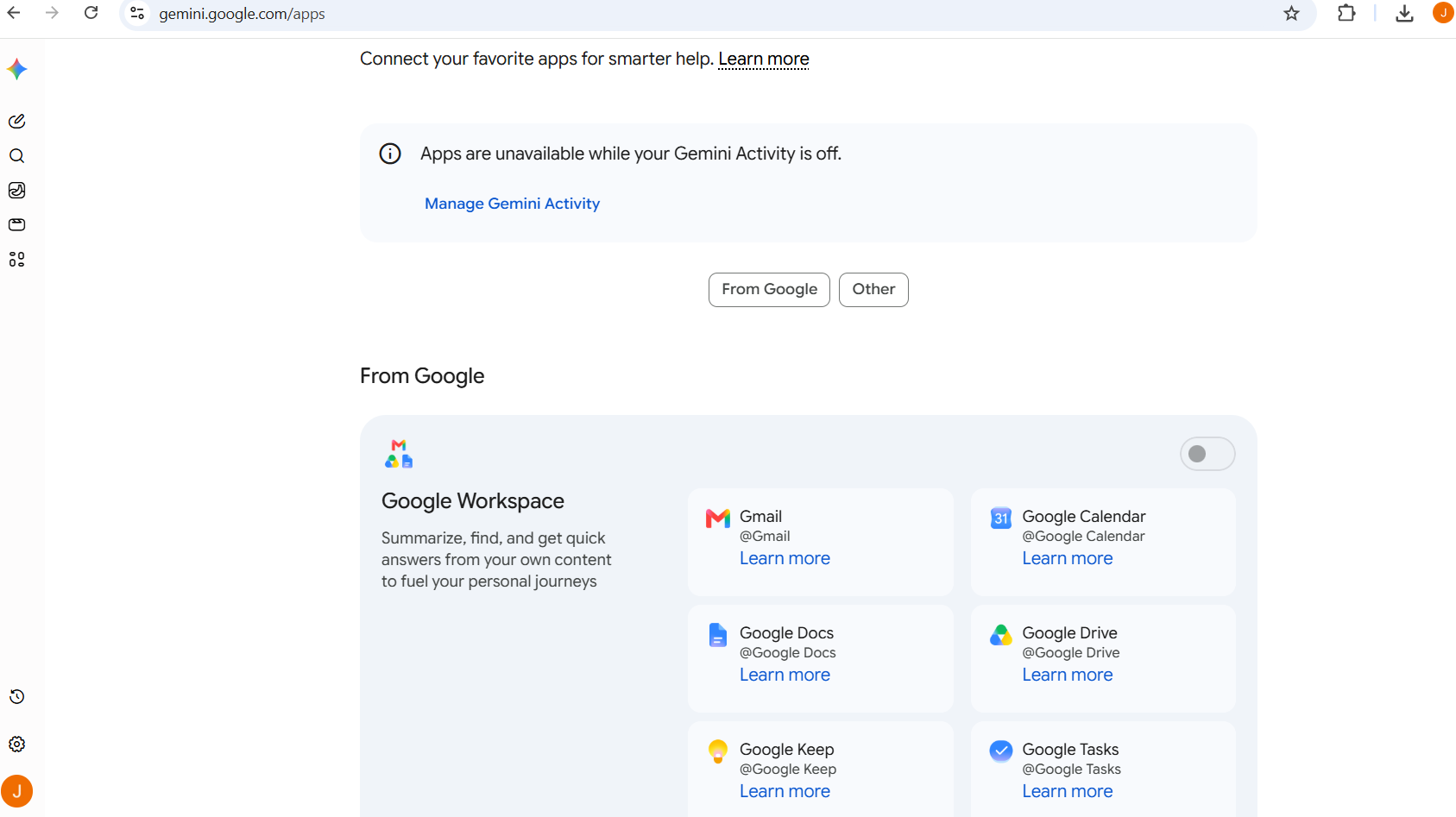
Turning Keep Activity off also has a practical consequence worth knowing before you do it: Workspace-connected apps, including Gmail, Calendar, Docs, Drive, Keep and Tasks, become unavailable to Gemini while the setting is off. That's why I wouldn't automatically tell everyone to switch it off. If Gmail and Drive integration is the reason Gemini is useful to you, you may prefer to keep it on and shorten the retention window instead.
Can Humans Review Gemini Chats?
Humans can review Gemini chats, yes, under specific, disclosed circumstances, not as a matter of routine. Seeing ‘human review' in a privacy policy can sound more alarming than the reality, so the scale matters. A subset of conversations may be reviewed by trained human reviewers, including third-party service providers, to assess response quality. Chats that have been through this review are retained separately for up to three years, even if you delete your regular activity, because they're no longer connected to your Google Account in the same way.
I'd take Google's own practical advice here: don't type something into consumer Gemini that you'd be deeply uncomfortable with a reviewer potentially seeing.
How Long Does Gemini Keep Your Data?
With Keep Activity on, Gemini activity is kept for 18 months by default; with it off, new chats are retained for up to 72 hours, while human-reviewed conversations can be retained separately for up to three years.
| Data | Current handling |
|---|---|
| Saved Gemini activity, Keep Activity on | 18 months by default, adjustable in Auto-delete settings |
| Keep Activity off | Up to 72 hours for service operation, not added to visible history |
| Human-reviewed conversations | Up to 3 years, retained separately from your account activity |
| Some account-level usage data | Retained until you delete your Google Account |
How Does Gemini Use Data From Gmail, Drive, Calendar and Maps?
Gemini uses data from Gmail, Drive, Calendar and Maps to power features for you individually when you've connected those services through Connected Apps, rather than to train its public AI models, according to Google's stated position. Because it lives inside your Google account, Gemini can draw on all four when connected. The same connections that make Gemini unusually convenient also widen the amount of your digital life it can potentially work with. There isn't one universally ‘right' privacy setting here. It depends whether you value the integration enough to keep it.
Nick runs a genuinely Google-integrated household, calendar, photos, the lot, so when we tested this together his instinct wasn't to disconnect everything on principle. It was to check each connection against a real question: does this integration actually save me something, or is it just switched on by default? That's a more useful test than a blanket rule either way.
What Happens When You Delete Gemini Activity?
Deleting Gemini activity removes it from your account view, but this is another place where the wider Google ecosystem matters. Deleting a Gemini chat doesn't mean you've deleted the underlying Gmail message, Drive file or other Google data the conversation may have referred to. Conversations already reviewed by a human reviewer aren't deleted by this action either, since Google states they're retained separately for up to three years precisely because they're no longer tied to your Google Account. See how to delete your data from AI chatbots for the full walkthrough.
Which Gemini Privacy Settings Should You Change?
The Gemini privacy settings I'd change first are Connected Apps, then Keep Activity, its auto-delete window and any location or service permissions Gemini can use. I'd start by removing connections I don't use, then decide how much history I actually want Google retaining.
- Decide on Keep Activity deliberately, understanding the Workspace-integration trade-off if you turn it off.
- Set a shorter auto-delete window if you want activity saved but not indefinitely, such as three months instead of the 18-month default.
- Review Connected Apps and remove any you no longer use.
- Check location and service access if privacy from other Google services matters to you.
Is Gemini Safe for Work?
Gemini can be appropriate for work when it's provided through an organisation-approved Workspace setup with the relevant enterprise protections; a personal consumer account should be treated differently. If Gemini is provided through your employer's Google Workspace account, the consumer rules above aren't the whole story. Eligible Workspace accounts can receive enterprise-grade data protections, including restrictions on using chats and uploaded files to improve Google's generative AI models, while retention and access settings may be controlled by your Workspace administrator. Check the protections attached to your organisation's specific Workspace plan before applying the consumer guidance above. See our guide on what AI safety means for organisations for the wider business picture.
Gemini vs ChatGPT vs Claude vs Perplexity: Which Is More Private?
Gemini's biggest differences from ChatGPT, Claude and Perplexity are its 18-month default activity retention and its much deeper integration with the wider Google ecosystem.
| Gemini | ChatGPT | Claude | Perplexity | |
|---|---|---|---|---|
| Consumer retention | 18 months default | Kept until deleted | Kept until deleted | Kept until deleted |
| Human review disclosed | Explicitly | For safety review | For safety review | No equivalent consumer-review detail found in the documentation we checked |
| Genuine differentiator | Google ecosystem integration | Broadest mainstream adoption | Strongest training consent | Cited web research |
See our breakdowns of ChatGPT, Claude and Perplexity, the full comparison in Are AI Chats Private?, what to keep out of any AI chat in what information you should never share with AI, or Best Private AI Chatbots if the ecosystem integration is more than you want, and the AI Safety hub for more on AI safety.
Is Google Gemini Safe? Our Final Verdict
Yes, I think Gemini is reasonably safe for everyday use if you're comfortable with the Google services you've connected and understand how Keep Activity works. I wouldn't avoid Gemini because it sits inside Google; for many people, that connection is exactly why it's useful.
I would, however, spend five minutes looking at Keep Activity and Connected Apps rather than assuming Gemini only knows what you've typed into the current chat. If you're comfortable with those connections and deliberate about what you share, Gemini is a reasonably safe everyday AI tool. If the wider account integration makes you uncomfortable, you can reduce it, with the understanding that some of the convenience disappears with it.
Sources and further reading
- Google Gemini Apps Privacy Hub
- Google: manage and delete your Gemini Apps activity
- Google Workspace: Gemini for Workspace data protections
Settings last checked: August 2026.
